
A monster in new colours
The game's monsters, props, rooms and fight backgrounds are 3D models with pictures painted over them, their textures. Since loader 2.64.0 a mod changes those pictures: new colours by numbers, or pictures of its own; for every model that uses a texture, or for one model of the mod's own. Rance Browser finds the texture, tries the change on the model and gives the Lua line.
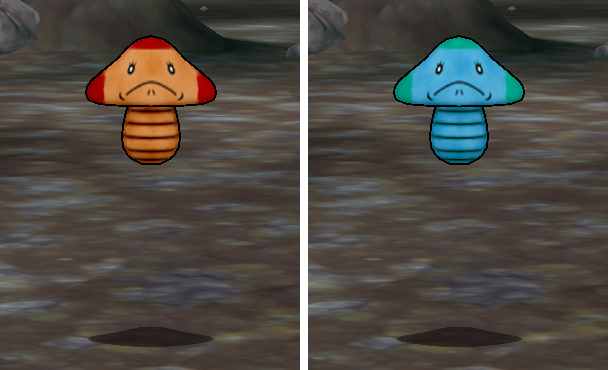
What the game draws
- A model's textures. Each model is a folder in the game's archive with its mesh and its pictures. A material of the mesh names the pictures it uses, each for one kind: a colour map (the picture you see), an alpha map (which parts are see-through), a light map (shadows painted on a room), and in a few models a normal or a specular map. A mod changes any of them, but it is the colour maps that give a model its colours. The words are explained in Learning 3D.
- The colour on screen is the colour map's point, times the light map's where there is one, times the colour of the mesh's points. A light map darkens your colours as it darkens the game's.
- See-through parts. A colour map with alpha cuts or blends: a solid material cuts the points whose alpha is under 0.75, a blended one (an effect, a glow) blends them. An alpha map cuts by its red (under 0.1) or multiplies by it.
- Frames. A few colour maps change while the model moves: the goldfish's body is
karada.png,karada[1].pngandkarada[2].png, and a motion picks one (the burner's flame shows only in its special attack this way). A change gives every frame. - What no texture touches: the black outline and the shadow under a monster.
- Where the game draws what.
Data/PolyData/Charaholds the fight monsters, the gold bags, the player's figure on the map and the girls' room's figures;Etcthe map's props;Mapthe rooms;BGthe fight backgrounds. Some props are in two folders under two names: the chest of a fight's table isChara/takarabako/takarabako.png, the chest on the mapEtc/takarabako/mapobject07_01.png. A model number (100122, the Cockroach) names itsCharafolder only. A change whose row keepsusedat 0 after the game loaded that model is on a texture nothing draws.
New colours by numbers
The quickest change is the game's own picture with its colours turned, in HSL:
-- The goldfish's body, cyan, wherever the game draws a goldfish.
rq.image.texture("Data/PolyData/Chara/kingyo/karada.png", { hue = 170 })hueadds degrees to each point's hue (-360 to 360);saturationandlightnessmultiply (0 to 4; 1 leaves them as they are).- Grey, white and black stay grey: hue and saturation move coloured points only. The Cockroach, grey all over, keeps its colour whatever the numbers; to colour a grey monster, paint a picture (below).
- Every frame of an animated texture changes the same way.
- Colours change colour maps only.
To pick the numbers, choose the model in Rance Browser's 3D tab and press Colours... by the texture under Its textures (or by Every colour texture, for "*"): the model shows the change each time you let go of a slider, and the Lua line is under What is tried, from a mod. The game's takes the numbers off.
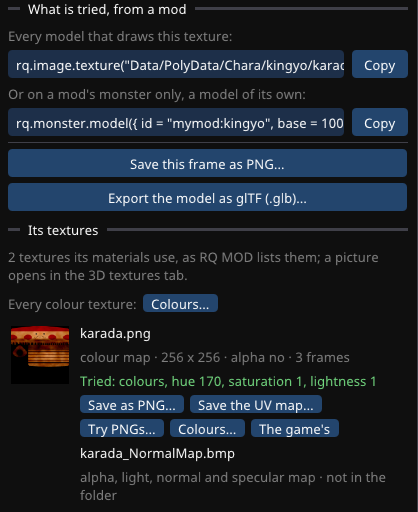
To look at the result in a picture viewer, or to start a painting from it, the script below turns a saved texture's colours as the game does, to the byte. Save the texture from Rance Browser, save the script as recolor.ps1, and run it:
# recolor.ps1: a picture's colors turned as RQ MOD's numbers turn them (hue, saturation, lightness).
param(
  [Parameter(Mandatory = $true)][string]$In,
  [Parameter(Mandatory = $true)][string]$Out,
  [double]$Hue = 0,          # degrees added to each point's hue
  [double]$Saturation = 1,   # a factor on its saturation (0: grey)
  [double]$Lightness = 1     # a factor on its lightness
)
Add-Type -AssemblyName System.Drawing
$src = [System.Drawing.Bitmap]::new((Resolve-Path $In).Path)
$w = $src.Width
$h = $src.Height
$rect = [System.Drawing.Rectangle]::new(0, 0, $w, $h)
$bmp = $src.Clone($rect, [System.Drawing.Imaging.PixelFormat]::Format32bppArgb)
$src.Dispose()
$data = $bmp.LockBits($rect, [System.Drawing.Imaging.ImageLockMode]::ReadWrite, $bmp.PixelFormat)
$px = New-Object byte[] ($data.Stride * $h)
[System.Runtime.InteropServices.Marshal]::Copy($data.Scan0, $px, 0, $px.Length)

function Get-Byte([double]$v) { [byte][Math]::Min(255, [Math]::Max(0, [Math]::Floor($v * 255.0 + 0.5))) }

for ($y = 0; $y -lt $h; $y++) {
  for ($x = 0; $x -lt $w; $x++) {
    $i = $y * $data.Stride + $x * 4                     # blue, green, red, alpha
    $r = $px[$i + 2] / 255.0
    $g = $px[$i + 1] / 255.0
    $b = $px[$i] / 255.0
    $mx = [Math]::Max($r, [Math]::Max($g, $b))
    $mn = [Math]::Min($r, [Math]::Min($g, $b))
    $l = ($mx + $mn) / 2.0
    $d = $mx - $mn
    $hu = 0.0
    $s = 0.0
    if ($d -gt 0) {                                     # hue and saturation (HSL)
      $s = $d / (1.0 - [Math]::Abs(2.0 * $l - 1.0))
      if ($mx -eq $r) { $hu = 60.0 * ((($g - $b) / $d) % 6.0) }
      elseif ($mx -eq $g) { $hu = 60.0 * (($b - $r) / $d + 2.0) }
      else { $hu = 60.0 * (($r - $g) / $d + 4.0) }
    }
    $hu = ($hu + $Hue) % 360.0                          # the change
    if ($hu -lt 0) { $hu += 360.0 }
    if ($hu -ge 360.0) { $hu = 0.0 }
    $s = [Math]::Min(1.0, $s * $Saturation)
    $l = [Math]::Min(1.0, $l * $Lightness)
    $c = (1.0 - [Math]::Abs(2.0 * $l - 1.0)) * $s       # back to red, green and blue
    $k = $c * (1.0 - [Math]::Abs((($hu / 60.0) % 2.0) - 1.0))
    $m = $l - $c / 2.0
    switch ([int][Math]::Floor($hu / 60.0)) {
      0 { $r1 = $c; $g1 = $k; $b1 = 0.0 }
      1 { $r1 = $k; $g1 = $c; $b1 = 0.0 }
      2 { $r1 = 0.0; $g1 = $c; $b1 = $k }
      3 { $r1 = 0.0; $g1 = $k; $b1 = $c }
      4 { $r1 = $k; $g1 = 0.0; $b1 = $c }
      default { $r1 = $c; $g1 = 0.0; $b1 = $k }
    }
    $px[$i + 2] = Get-Byte ($r1 + $m)
    $px[$i + 1] = Get-Byte ($g1 + $m)
    $px[$i] = Get-Byte ($b1 + $m)
  }
}
[System.Runtime.InteropServices.Marshal]::Copy($px, 0, $data.Scan0, $px.Length)
$bmp.UnlockBits($data)
$bmp.Save($ExecutionContext.SessionState.Path.GetUnresolvedProviderPathFromPSPath($Out),
  [System.Drawing.Imaging.ImageFormat]::Png)
$bmp.Dispose()
powershell -ExecutionPolicy Bypass -File recolor.ps1 -In karada.png -Out karada-cyan.png -Hue 170It takes a few seconds for a picture of 256 by 256, half a minute for 512 by 512. What the mod ships is the Lua line with the numbers: the game turns its own picture when it loads the model.
A picture of your own
Find the texture. In Rance Browser's 3D tab, choose the model; Its textures lists its pictures with their kind, size, frames and alpha. Choose the colour map to change.
Save it and its UV map. Save as PNG... saves the texture, and Save the UV map... its UV map: the model's triangles that use this picture, each laid where its UVs put it on the picture. Painting inside a shape colours that part of the model.
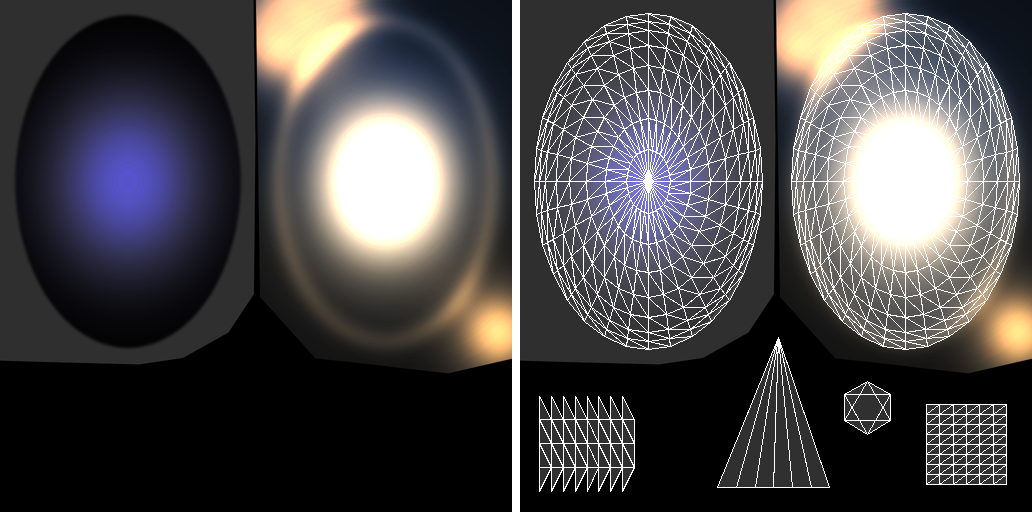
Paint. Open the texture in Krita or GIMP, put the UV map over it as a layer, and paint inside its shapes. Keep the size's proportions (another size is drawn over the same UVs). Where the game's texture has alpha, your PNG's alpha decides the holes, and a PNG without alpha takes the game's; where it has none, the PNG is drawn solid. Rance Browser's list says which:
- alpha yes: your alpha decides (a PNG without alpha keeps the game's holes);
- alpha no: drawn solid;
- its own alpha map with alpha no (the burner's flame): the game's holes stay whatever the PNG.
Try it. Try a PNG... (Try PNGs... for a texture with frames) puts your PNG on the texture: the model shows it at once, and the Lua line to copy is under What is tried, from a mod. The game's takes it off.
From a mod. Put the PNG in the mod's folder and call the line, at the mod's top level or when you want it:
-- The Cockroach in the mod's own colours, wherever the game draws it.
rq.image.texture("Data/PolyData/Chara/gokiburi/gokiburi.png", "textures/roach.png")
A texture with frames takes a list of PNGs, one per frame, as many as the game has.
One monster only
rq.image.texture changes every model that uses the texture. For one monster of the mod's own, give a model of its own its pictures with rq.monster.model's textures, then put a monster on it:
local ROACH_MODEL = 100122 -- rq.monster.get(rq.ids.monster.COCKROACH).model
local BLUE = rq.monster.model({ id = "mymod:blue_roach", base = ROACH_MODEL,
  textures = { ["gokiburi.png"] = "textures/roach-blue.png" } })
-- A new monster on it,
rq.monster.define({ id = "mymod:blue_roach", base = rq.ids.monster.COCKROACH, name = "Blue Roach",
  model = BLUE })
-- or one of the game's.
rq.monster.edit(rq.ids.monster.COCKROACH, { model = BLUE })- The keys are the textures' names in the base's folder, as
rq.image.textures(base)lists them. "*"takes colours for every colour map of the model; a name given beside it wins:textures = { ["*"] = { hue = 90 }, ["hair&cross.png"] = "textures/hair.png" }.- The game loads such a model apart from its base, so the base and the game's monsters on it keep their pictures. It costs a second copy of the model in memory.
- A mod's model plays its base's attack effects and waits for its hits as its base does.
When a change shows
- A change made at a mod's top level shows from the first load.
- A change made while the game runs shows the next time the game loads the model and holds no copy of it: in a fight, from the next fight's monsters; on a quest's map, from the next area (an area loads every prop on it with the area, seen or not); in the girls' room, at the next visit.
- A copy loaded meanwhile beside one the game holds has the old pictures too: a chest placed beside another shows the game's picture until the next area.
- A fight background keeps its pictures while fights follow on it, until a fight on another background, the quest's end, a load or a restart.
Things to know
- Every kind of PNG is read: 8 or 16 bits, grey, a palette, interlaced, a transparent colour. Up to 4096 pixels a side. A file the game cannot use is refused when you call, with the reason.
- Each load reads the file again. A file gone or broken by then logs a warning once, and the game's picture is drawn.
- Frames are all or none, on colour maps only: a list as long as the game's frames.
- Colours start from the game's own picture, never from another mod's.
- On one path the last call wins, whichever mod made it; a model's own textures stay over it.
rq.image.texturessays who changed a row (mod): a mod that turns its own change off checks it first, so it does not take another mod's away. - A call again to
rq.monster.modelreplaces the whole definition: give every field again, as an omitted one goes back to the base's. - What a mod ships: numbers, or pictures of its own. A PNG made from the game's texture (as the script's) stays on your PC, as the game's files do; the mod ships the numbers.
The reference has every rule and error: rq.image.texture, rq.image.textures and rq.monster.model.