
Looking through the game's files
Rance Browser (rance-browser.exe) is a window over the game's own files: its pictures, Flash files, music, sounds, 3D models and their textures, and the names rq.ids gives. Find what you want to change, read its number, copy the Lua line that replaces or plays it, and save the file to look at or draw over.
It came with loader 2.43.0 as RQ Browser (rq-browser.exe). Since 2.55.1 it is Rance Browser, a program with a repository of its own that RQ MOD's package carries; its version (1.0.0 in loader 2.55.1, 1.2.0 in 2.63.0, 1.3.0 in 2.64.0) shows in its title bar.
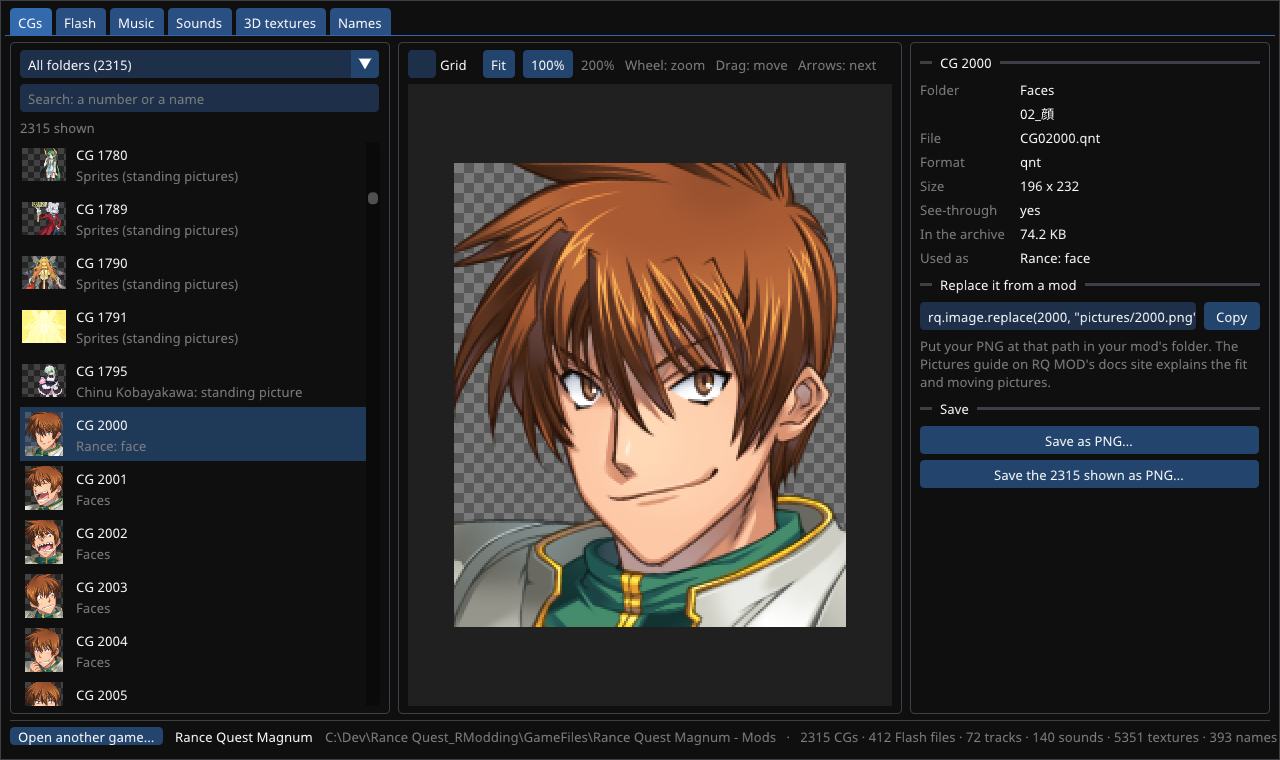
Opening it
rance-browser.exe is in the game's xsystem4 folder, beside xsystem4.exe. Double-click it: it opens the game folder above it. Run from somewhere else, it asks for the game folder once and remembers it in rance-browser.json beside it (an rq-browser.json left by RQ Browser is read when there is no other). To name a folder:
rance-browser.exe --game "D:\Games\Rance Quest Magnum"It only reads the game's archives and never changes the game's files, so the game may run at the same time. The one file it writes there is its own rance-browser.json, beside it.
On a screen that Windows scales (125 %, 150 %), the text and the panels grow with the scale and stay sharp. For another size, start it with --scale, from 1 to 4:
rance-browser.exe --scale 1.25The tabs
| Tab | What it lists | The Lua line it gives |
|---|---|---|
| CGs | The 2,315 pictures by CG number, in the game's folders: faces, standing pictures, scene CGs, backgrounds, the interface | rq.image.replace(no, "pictures/no.png") |
| Flash | The 412 Flash files (battle effects, monster attacks, cut-ins, the interface), played as the game plays them, each with its pictures and sounds; a .swf or .aff from disk too | rq.image.add_flash(key, path), rq.image.play_flash(key, opts), rq.image.flash_bitmap(file, id, path), rq.image.flash_bitmaps(file), rq.sound.play_flash(file, { index = n }) |
| Music | The 72 tracks with the game's names, played with their loops | rq.music.replace(no, "music/no.ogg"), rq.music.play(no) |
| Sounds | The 140 sound effects | rq.sound.play(no) |
| 3D models | The 647 models (monsters and the party's figures, dungeon rooms, fight backgrounds, the map's props), drawn as the game draws them, with their motions; each exported as a .glb for Blender; a PNG or colours tried on a texture, its UV map | rq.monster.model({ id = ..., base = model }), rq.image.texture(path, "textures/name.png"), rq.battle.start({ ..., background = ... }), rq.dungeon.place("custom", x, z, { look = ... }) |
| 3D textures | The 5,351 textures of the 3D models: characters, map rooms, backgrounds | rq.image.texture(path, "textures/name.png") |
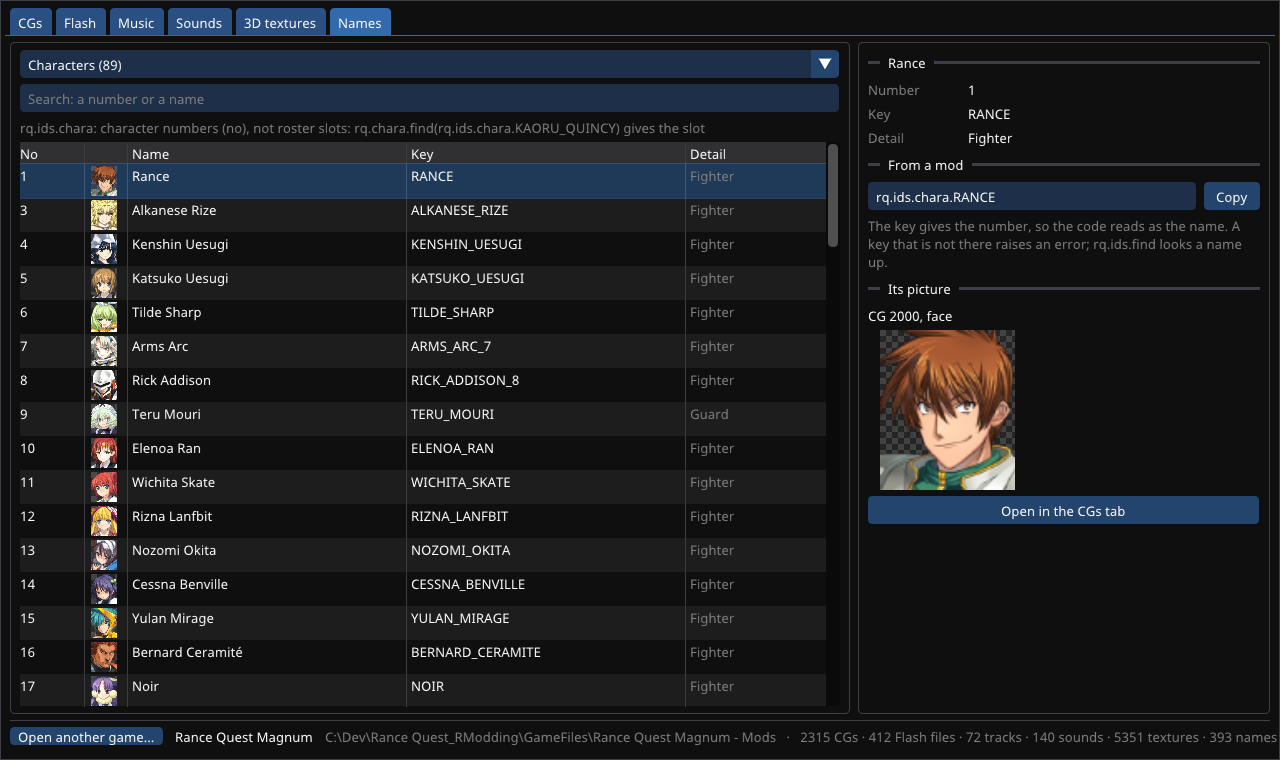
| Names | Every rq.ids list, with each name's key and the game's picture for it | rq.ids.chara.RANCE and so on |
Each Lua line has a Copy button. The paths in it are examples: put your file where the path says, in your mod's folder, or change the path.
Finding things. The search box takes a number or a name; English letters match in any case. In the CGs tab a name is what a picture is used as ("Rance: face", "Alkanese Rize: standing picture"), so searching face or a character's name finds their pictures. The folder list narrows the CGs and the textures. Up and Down go to the next one, Page Up and Page Down by a page.
Looking closely. In the CGs and 3D textures tabs, Grid shows thumbnails; double-click one to view it. In the view the mouse wheel zooms around the pointer, dragging moves the picture, Fit and 100% set the size. From 200 % each pixel is a sharp square. A checkerboard shows through the see-through parts.
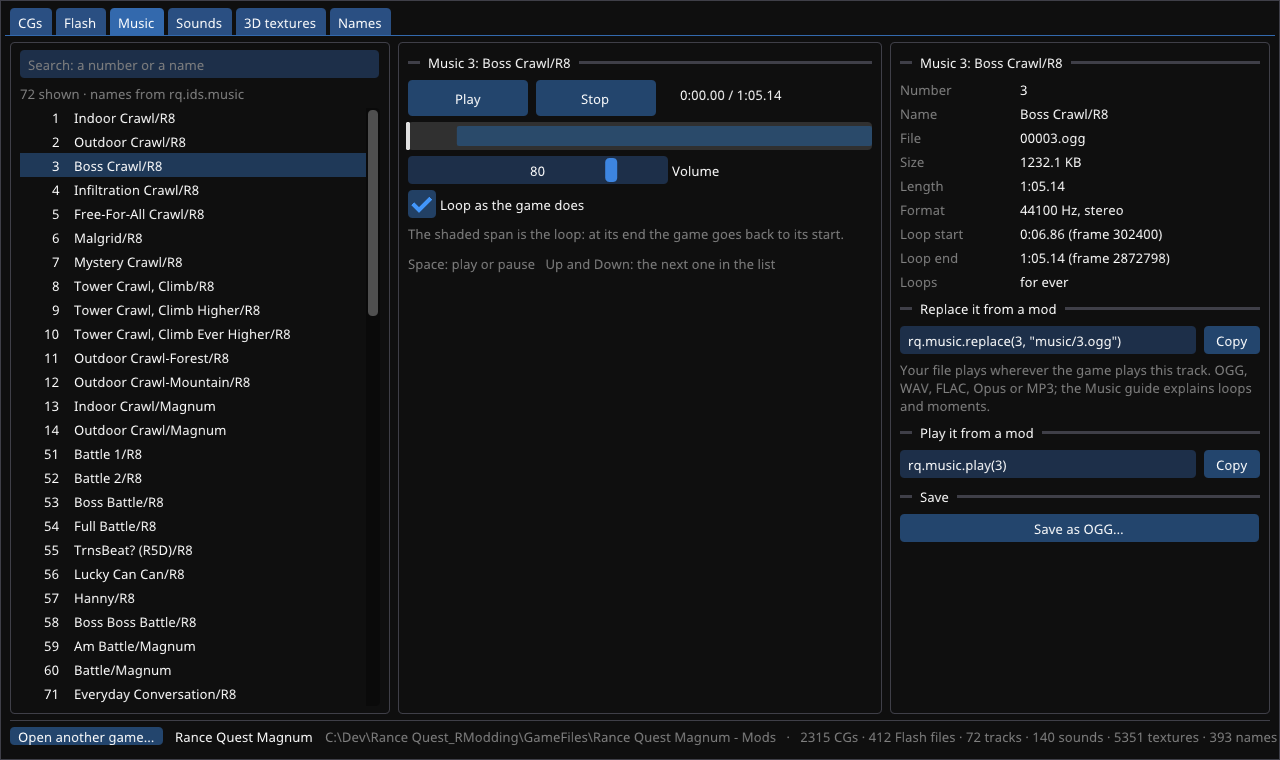
Listening. In the Music and Sounds tabs, double-click a row or press Space to play. The seek bar shades a track's loop: with Loop as the game does on, the track goes back to the loop's start at its end, as in the game. The details give the loop points in seconds and in sample frames. Opening another tab stops what plays.
Flash files. The Flash tab plays a file as the game plays it: at 30 frames a second (the game plays every Flash file at 30, whatever the file says), with its actions, its sounds at their frames and its blend modes. Play (Space), the first and last frame, a frame back or on (Comma and Period), the frame slider, Loop, Sounds, the speed, what lies under it (squares, black or white) and the zoom. What the game makes of it, on the right, checks the file by the engine's rules: whether the game plays it, with each problem's frame and what to do, and what the file holds. Save this frame as PNG... saves the frame shown.
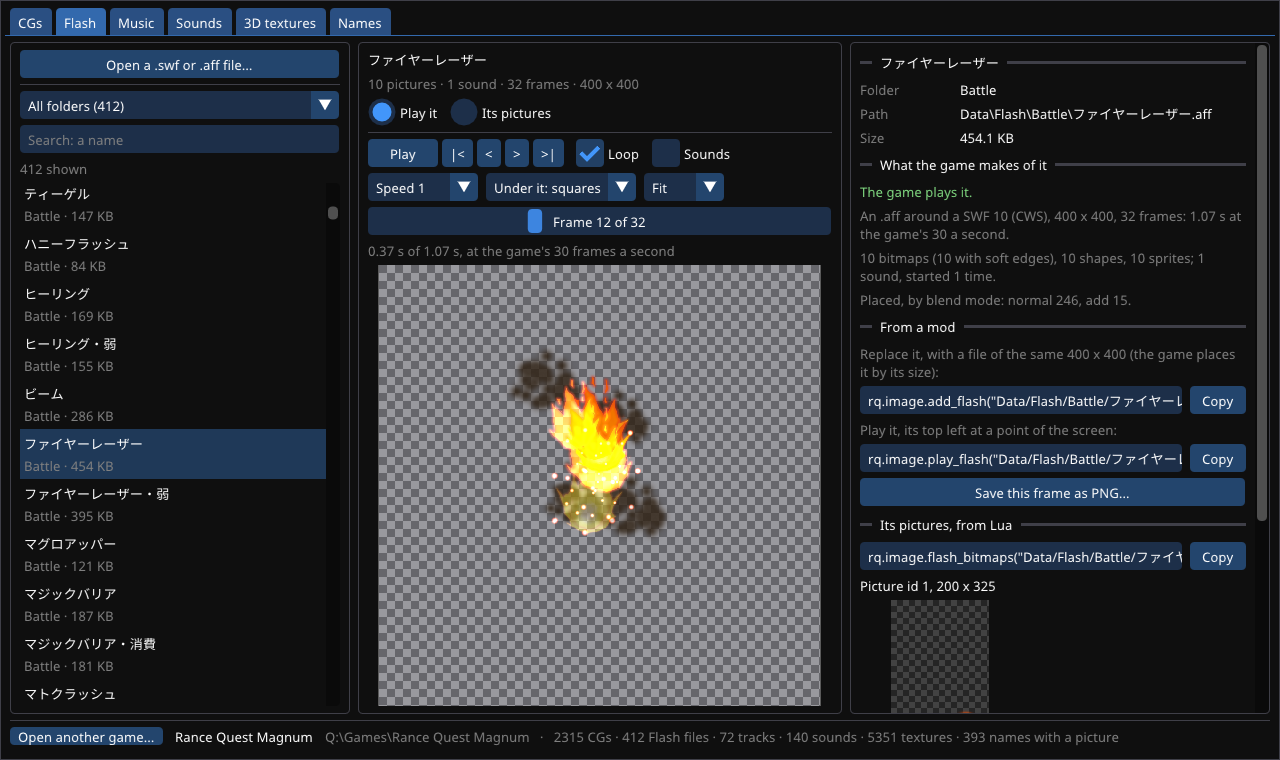
Its pictures shows the file's pictures with their ids and sizes, which is what rq.image.flash_bitmap needs, and the Lua lines name the file as the calls take it (a bare name for a file in System, the full path for the others). Its sounds play when the file stores them plainly; a compressed one is marked so.
A file from disk. Open a .swf or .aff file... above the list, a file dropped on the window, or its path on the command line opens a Flash file of your own, to watch it and check it before it goes into a mod (Animations).
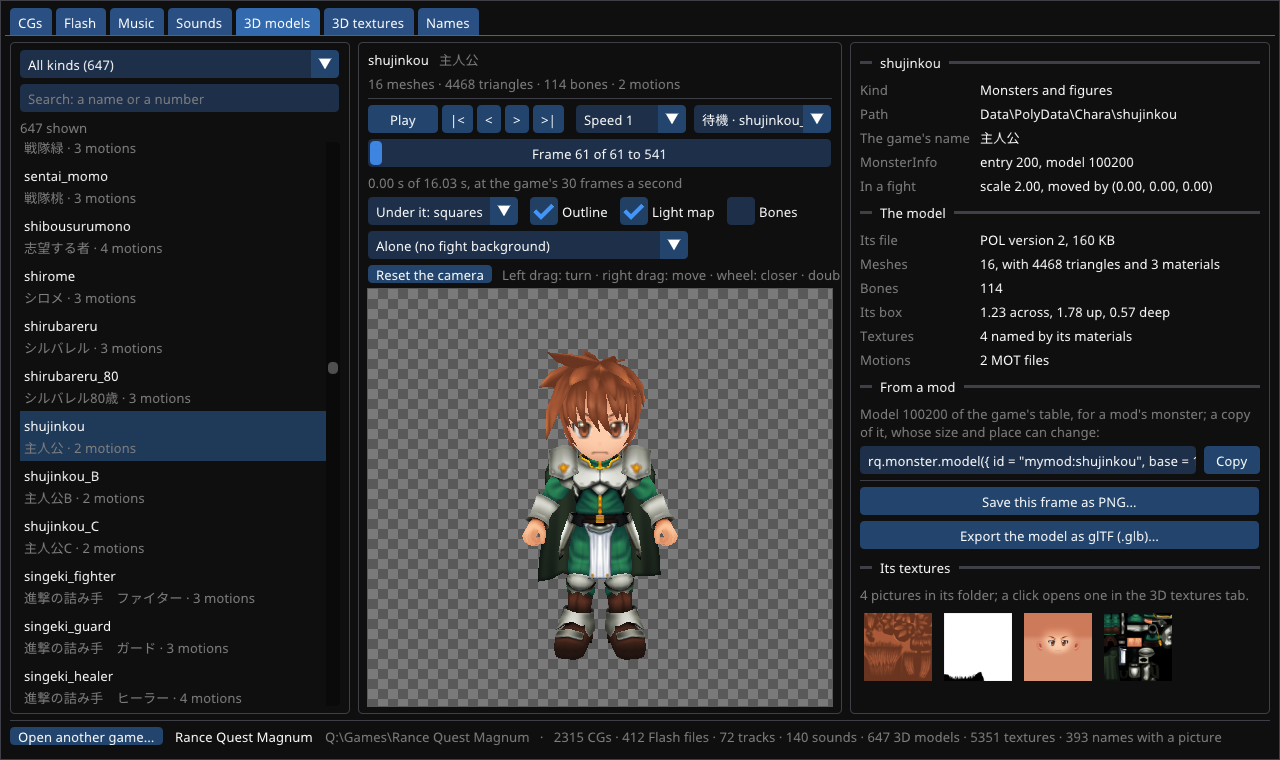
3D models. The 3D models tab draws each of the game's models with the game's own renderer: its motions at 30 frames a second with the frames the game plays, its bones, a room's walk mesh, a monster on a fight background with its shadow and the fight's camera. Save this frame as PNG... saves the view, and Export the model as glTF (.glb)... writes the model for Blender and other 3D programs. Game models in Blender goes through the tab and the export step by step, and Learning 3D explains the words. Exported models are for your own use, as below.
Its textures, in the 3D models tab, lists the model's pictures with their kind, size, frames and alpha. By each one, Save as PNG... and Save the UV map... save the picture and where the model's triangles lie on it, Try a PNG... and Colours... show the model with your picture or with its colours turned by numbers, as RQ MOD draws it, and The game's takes that off; the Lua line is under What is tried, from a mod. A monster in new colours goes through it.
Names. The Names tab lists each rq.ids kind with its numbers, keys and details. A character shows its face, an item its icon, a monster its model; Open in the CGs tab goes to that picture, and Open in the 3D tab to that model with the monster's own motions.
Saving
- Save as PNG (pictures, Flash pictures, textures) or Save as OGG (music and sounds, the file as the game stores it).
- Save the N shown as PNG saves everything the list shows into a folder you pick, with a progress bar and Cancel. Narrow the list first: a folder, or a search. Textures go into
folder\model\name.png. - Save all N pictures in the Flash tab saves a file's pictures as
<id>_<w>x<h>.png, the namesrqmod-ctl flashdumpuses. - Save this frame as PNG... and Export the model as glTF (.glb)... in the 3D models tab, and Save the UV map... by a texture under Its textures.
The game's files belong to AliceSoft. Keep the saved copies for your own work, and share only what you made.
From a script
rance-browser.exe --check [--out report.json]
rance-browser.exe --shot cgs shot.png [--select 2000] [--grid]
rance-browser.exe --shot flash shot.png --file my_effect.aff --frame 12
rance-browser.exe --shot 3d shot.png --select gokiburi [--motion gokiburi_kougeki] [--frame 10]
rance-browser.exe --shot 3d shot.png --select gokiburi --fight bgA_00_douk --fight-camera
rance-browser.exe --export gokiburi.glb --select gokiburi
rance-browser.exe --export models --kind chara
rance-browser.exe my_effect.aff
rance-browser.exe --help
--check opens every archive, decodes some of each kind, reads every track's loop and every sound, checks every Flash file and plays it to its end, draws every 3D model and plays every motion, and prints a report in JSON; it ends with 0 when all went well. --shot saves one tab (cgs, flash, music, sounds, 3d, textures or names) as a PNG, with --select choosing the number, row or kind shown (in the Flash tab also a file's name; in the 3D tab a model's folder, Kind/folder such as Etc/takarabako, or a model number such as 100122), --grid the pictures' grid, --frame a Flash file's frame or a motion's, --file a Flash file from disk, --size WxH the picture's size and --scale the layout's (1 unless given). In the 3D tab, --motion picks a MOT of the model's folder (or none), --bones and --walk draw the skeleton and the walk mesh, and --fight puts a monster on a fight background, with --fight-camera for the game's camera. --export writes one model as a .glb, or with a folder, every model of a kind (--kind chara, map, bg or etc) or --all, with a report export.json. A .swf or .aff path alone opens that file in the Flash tab.
Other games
Rance Browser also opens other AliceSoft games on the same engine (System 4), for players and wiki writers: Open another game... at the bottom picks one. Rance VI - Collapse of Zeth, Sengoku Rance, Rance 01, Rance 02 and Rance 03 are tested, each with English labels for its CG groups; the others open marked "not tested". There the Names tab and the Lua lines are gone, since RQ MOD's calls work in Rance Quest Magnum only, and other tabs appear when a game has those files (Rance VI's dungeon textures, Rance 03's voices). Its README lists the games and what each shows.