
Animations
The game's battle effects, the marks on fight cards and the skill cut-ins are Flash animations: a series of pictures with their timing, and sometimes a sound. Since loader 2.63.0 a mod can bring its own. Draw the frames in any program, turn them into the game's .aff file with rqmod-aff, check the file in Rance Browser, and play it from Lua or put it in place of one of the game's.

What the game plays
- Pictures. The game's animations are pictures that move, turn, fade and blend, not drawings made of lines.
rqmod-aff buildturns each frame you give it into a picture. - 30 frames a second. The game plays every Flash file at 30 frames a second, whatever the file says. You choose how many of your frames make a second, from 1 to 30: at 15, each one shows for two of the game's.
- A size of its own. Each file has a size, its stage. Most of the game's battle effects are 400 by 400, and a file is placed by its own size (see Replacing one of the game's). Rance Browser's Flash tab shows each file's size.
- Sound as WAV. A sound starts at a frame you choose. A WAV the game cannot hold as it is (48000 Hz, 24-bit) is converted to 44100 Hz 16-bit; MP3 and Ogg are refused, so export a WAV.
1. Draw the frames
Any program that saves an animation as one PNG per frame works: Krita, Aseprite, GIMP (each layer exported as its own file), Blender, After Effects, or AniCraft, a free and open-source program in the manner of Animate, still in an early version, which exports a PNG sequence and its sound as WAV.
Keep the see-through parts see-through (PNG with alpha), and give every frame the same size. The frames are taken in name order, so number them with leading zeros: frame_001.png, frame_002.png, and so on.
The example on this page is drawn by a short script instead: a ring that grows and fades, 20 frames of 128 by 128. Save it as frames.ps1:
# frames.ps1: 20 frames of a ring that grows and fades, 128 by 128, into a folder "frames".
Add-Type -AssemblyName System.Drawing
$dir = Join-Path $PSScriptRoot "frames"
New-Item -ItemType Directory -Force -Path $dir | Out-Null
for ($i = 0; $i -lt 20; $i++) {
  $t = $i / 19                                   # from 0 to 1 over the animation
  $a = [int](255 * (1 - $t))                     # from solid to see-through
  $bmp = [System.Drawing.Bitmap]::new(128, 128)  # see-through to start with
  $g = [System.Drawing.Graphics]::FromImage($bmp)
  $g.SmoothingMode = "AntiAlias"
  $r = 8 + 52 * $t                               # the ring grows
  $pen = [System.Drawing.Pen]::new([System.Drawing.Color]::FromArgb($a, 255, 190, 40), [single](10 - 8 * $t))
  $g.DrawEllipse($pen, 64 - $r, 64 - $r, 2 * $r, 2 * $r)
  $s = 14 * (1 - $t)                             # a white dot in the middle shrinks
  $brush = [System.Drawing.SolidBrush]::new([System.Drawing.Color]::FromArgb($a, 255, 255, 255))
  $g.FillEllipse($brush, 64 - $s, 64 - $s, 2 * $s, 2 * $s)
  $g.Dispose()
  $bmp.Save((Join-Path $dir ("frame_{0:D3}.png" -f ($i + 1))), [System.Drawing.Imaging.ImageFormat]::Png)
  $bmp.Dispose()
}
and run it with Windows' own PowerShell, in a terminal in the script's folder:
powershell -ExecutionPolicy Bypass -File frames.ps1It writes frames\frame_001.png to frame_020.png beside the script.
2. Build the file
rqmod-aff.exe is in the game's xsystem4 folder, beside xsystem4.exe. It runs in a terminal (PowerShell or Command Prompt). In the folder that holds frames:
"D:\Games\Rance Quest Magnum\xsystem4\rqmod-aff.exe" build frames ring.affIt says what it made, then checks the result:
20 pictures: 19 stored, 0 held, 0 shown again, 1 empty; 20 frames at the game's 30 a second (0.67 s), 0 sounds
ring.aff: the game plays it
  aff holding CWS, SWF 8, 128 x 128, 20 frames (0.67 s at the game's 30 frames a second), header 30 fps
  19 bitmaps (0.11 million pixels), 19 shapes, 0 sprites, 19 placements, 0 sounds (0.00 s)
  blend modes: normal 19
wrote ring.aff (25111 bytes)
Each picture is cut to the part that shows, and a frame like the one before is kept once and held, so the file stays small. What build takes after the two names:
| Option | What it does |
|---|---|
--fps N | N of your frames a second, from 1 to 30 (default 30). Each frame is held for whole frames of the game's 30: --fps 15 plays the example in 1.33 s. |
--sound FILE.wav@N | Starts a WAV at frame N (@N left out: the first). Give it more than once for more sounds. |
--size WxH | A stage larger than the frames, with them in its middle: for a file that takes the place of one of the game's. |
An output name ending in .swf makes a compressed SWF instead, which other Flash viewers open. The game takes both.
3. Check it
rqmod-aff check ring.aff reads a file and says whether the game plays it. For a file the game would not play, it lists each problem with its frame, its tag and what to do. It takes any SWF, such as one exported by Flash or Animate, and ends with 0 when the game plays the file, 1 when it would not.
To watch it, open it in Rance Browser: Open a .swf or .aff file... above the Flash tab's list, or drop the file on its window. It plays as the game plays it, at 30 frames a second with its sounds, and the right side gives the same check and the Lua lines for it.
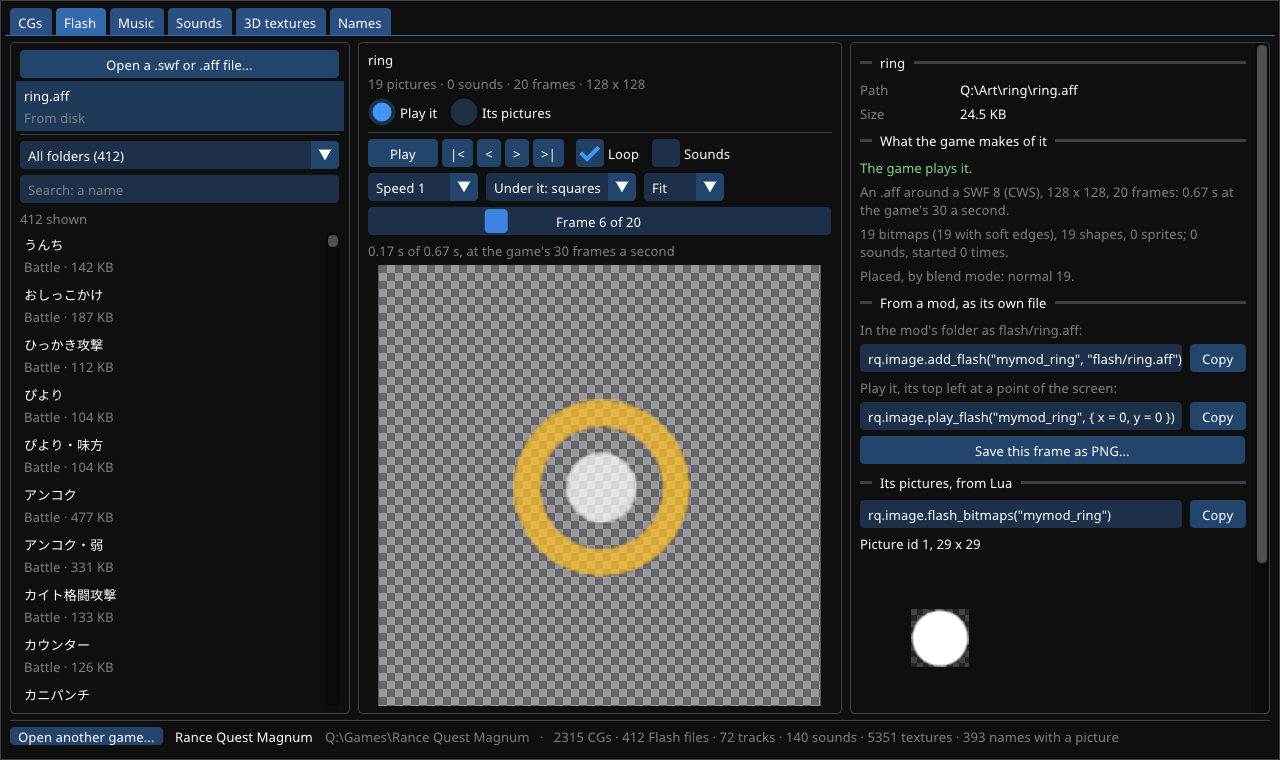
4. Play it from a mod
Put the file in your mod's folder, for example as flash/ring.aff, and add it under a key in init.lua:
rq.image.add_flash("mymod_ring", "flash/ring.aff")add_flash checks the file again by the same rules: a file the game would not play is refused with the first problem, and nothing of it reaches the game. Then play it where you want it:
-- Once, in the middle of the screen, over the HUD
rq.spawn(function()
  rq.image.play_flash("mymod_ring", { x = 448, y = 320, z = "top", wait = true })
  rq.log("the ring has played")
end)

-- Over the first enemy when a fight starts
rq.battle.on_start(function()
  rq.image.play_flash("mymod_ring", { attach = { card = 11 }, z = 20 })
end)
play_flash plays the file once, from its first frame to its last, and removes it; from and to choose the frames, loop = true plays it until you remove it, and on_end runs after its last frame. wait = true works in a job from rq.spawn.
For an animation that stays on screen, use a sprite: it plays the file over and over.
local ring = rq.sprite.new({ flash = "mymod_ring", x = 40, y = 40 })
ring:stop()       -- held on the frame it is on
ring:frame(10)    -- shows frame 10
ring:play({ from = 1, to = 20, loop = false })
sound = false keeps its sounds quiet. rq.image.flash_info("mymod_ring") gives the file's size, frames, length, pictures and sounds.
Replacing one of the game's
A key named like one of the game's files puts your file in its place, wherever the game plays it. In Rance Browser's Flash tab, find the effect: the tab plays it, names it as the Lua calls take it, and gives its size.
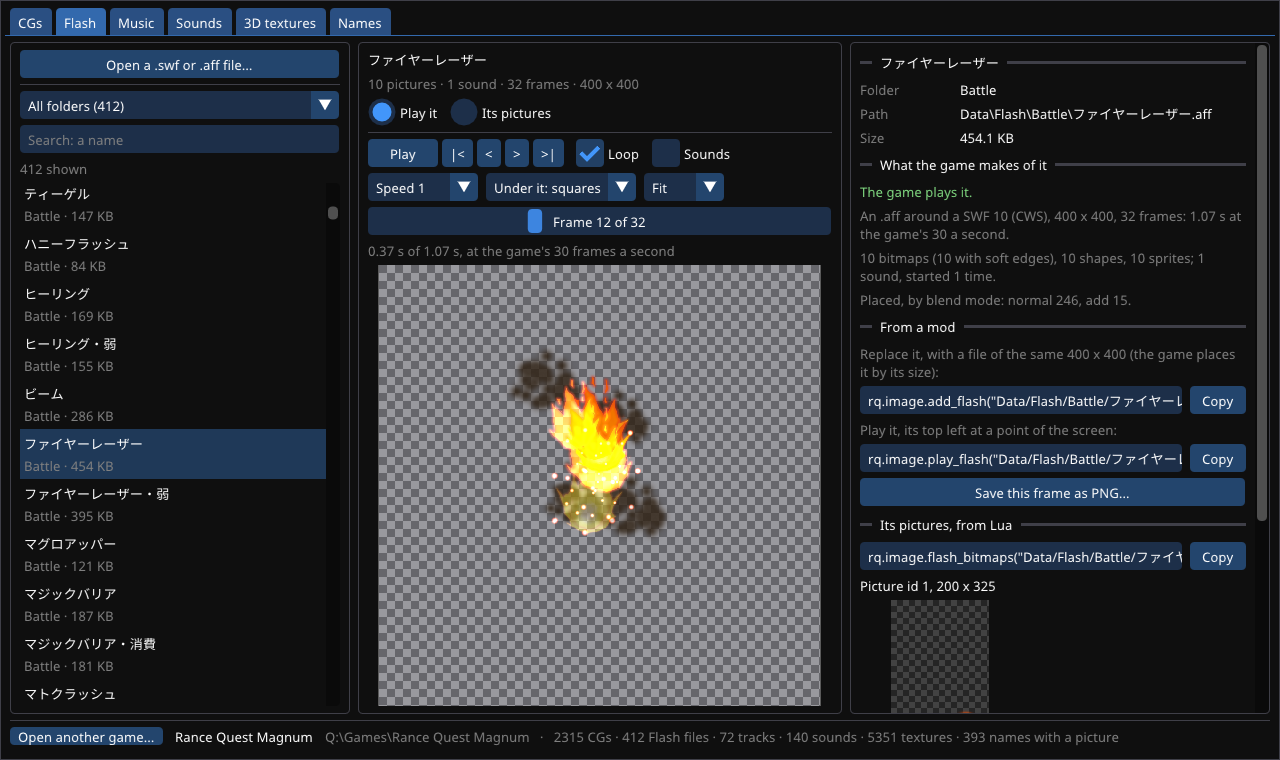
Make yours at the same size. The game places a file by its own size: a battle effect's 400 by 400 stage goes over its target from its top left, so a smaller file is drawn off its place. --size puts smaller frames in the middle of a stage of the size you give:
rqmod-aff build fire_frames my_fire.aff --size 400x400rq.image.add_flash("Data/Flash/Battle/ファイヤーレーザー.swf", "flash/my_fire.aff")Every fight now plays yours for Fire Laser. rq.image.remove_flash(key) gives the game's file back. A replacement counts for every mod: when two mods replace the same file, the last one loaded wins.
To take one of the game's files apart in another program, unpack writes it as a plain SWF, which viewers such as JPEXS Free Flash Decompiler open, and list names them all:
rqmod-aff unpack --game "D:\Games\Rance Quest Magnum" "Data/Flash/Battle/ファイヤーレーザー.swf" fire.swf
rqmod-aff list --game "D:\Games\Rance Quest Magnum"
Things to know
- Keep animations small. Every frame is a picture: the example's 20 frames of 128 by 128 make 25 KB, but a full screen for two seconds makes megabytes. Draw only the part that moves.
- What the game does not play: drawings of lines and fills (vector shapes), text, JPEG pictures, MP3 or other compressed sound, filters, and scripts beyond stop, play and going to a frame.
rqmod-aff checknames each one;buildmakes none of them. - The pictures inside a file take
rq.image.flash_bitmap, as the game's do (Pictures). - Limits: 64 MB a file, uncompressed, and 32 million pixels in its pictures; 256 MB for all the files mods add; 1024 keys, shared with GIFs and the marks' pictures. Past one,
add_flashraises an error. - A path is looked up in the folder of the mod whose code calls
rq.image, as for music.